

Download GameSir Connect – controller optimization, firmware update, profile customization, PC gaming, GameSir Tarantula Pro, GameSir Super Nova
Overview
GameSir Connect is a dedicated mobile application developed by GameSir to enhance the functionality of select GameSir gaming controllers when used with a PC. Designed specifically for users who rely on high-performance input devices for competitive and immersive gaming, the app serves as a bridge between physical controllers and their digital configurations. Its primary purpose is to streamline firmware updates and enable detailed profile customization, directly addressing common challenges such as outdated drivers and inconsistent control responsiveness. The app targets PC gamers who own compatible GameSir models, particularly the Tarantula Pro and Super Nova, offering them a centralized tool to optimize their setup without relying on third-party software.
By allowing users to adjust button mappings, joystick sensitivity, and trigger settings, GameSir Connect helps tailor gameplay to individual preferences, improving both comfort and precision. Real-world use cases include preparing for esports tournaments, adapting controls for different genres (e.g., adjusting sensitivity for first-person shooters), or ensuring consistent performance across multiple games. The app plays a vital role in the broader gaming ecosystem by extending the lifespan and utility of hardware through software enhancements. Although the developer did not provide additional technical details about its development background, its focus on seamless integration and user-centric design reflects a strong commitment to the PC gaming community.
Key Features & Functionality
- Easy Firmware Updates: The app enables users to check for and install firmware updates with a single click. By connecting a supported GameSir controller to a PC, the software automatically detects available updates, ensuring drivers remain current for optimal performance and stability.
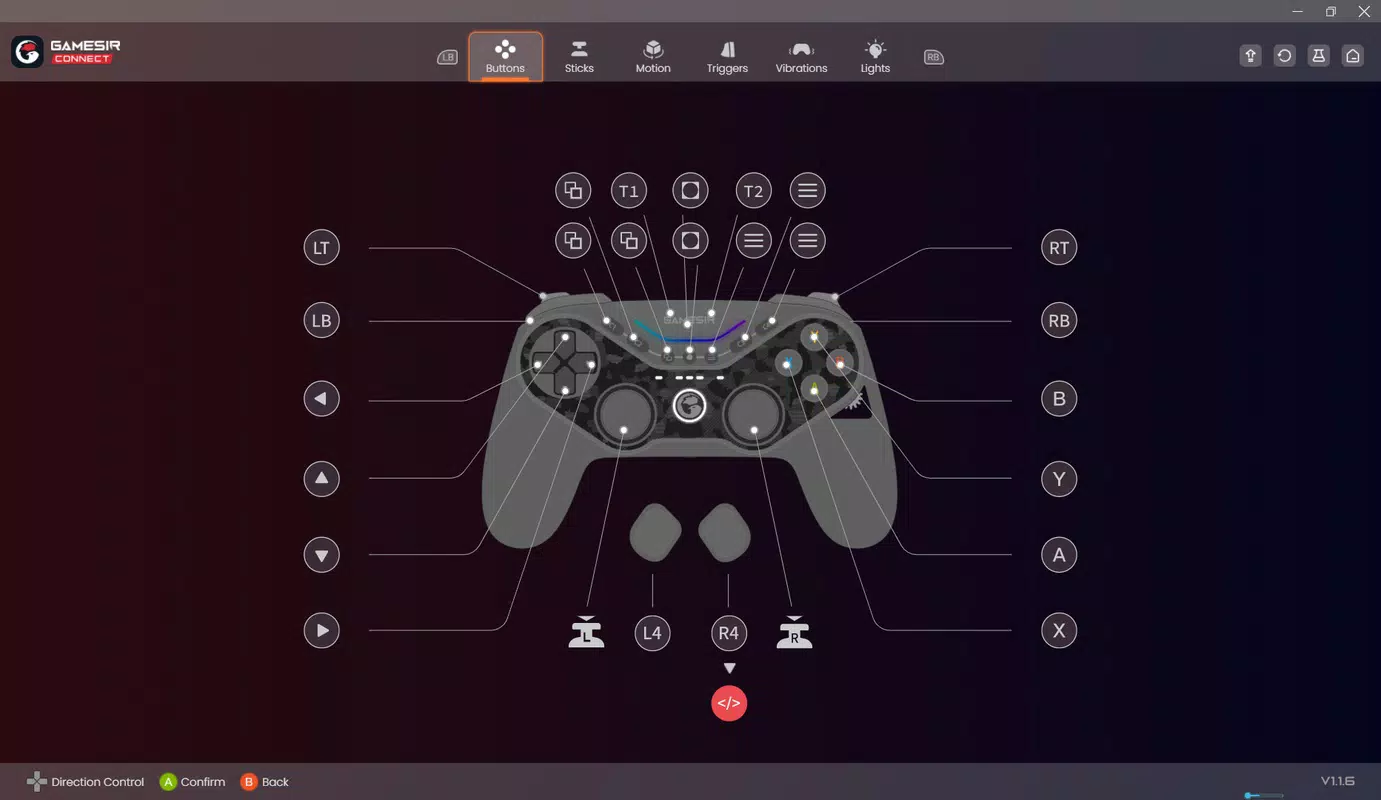
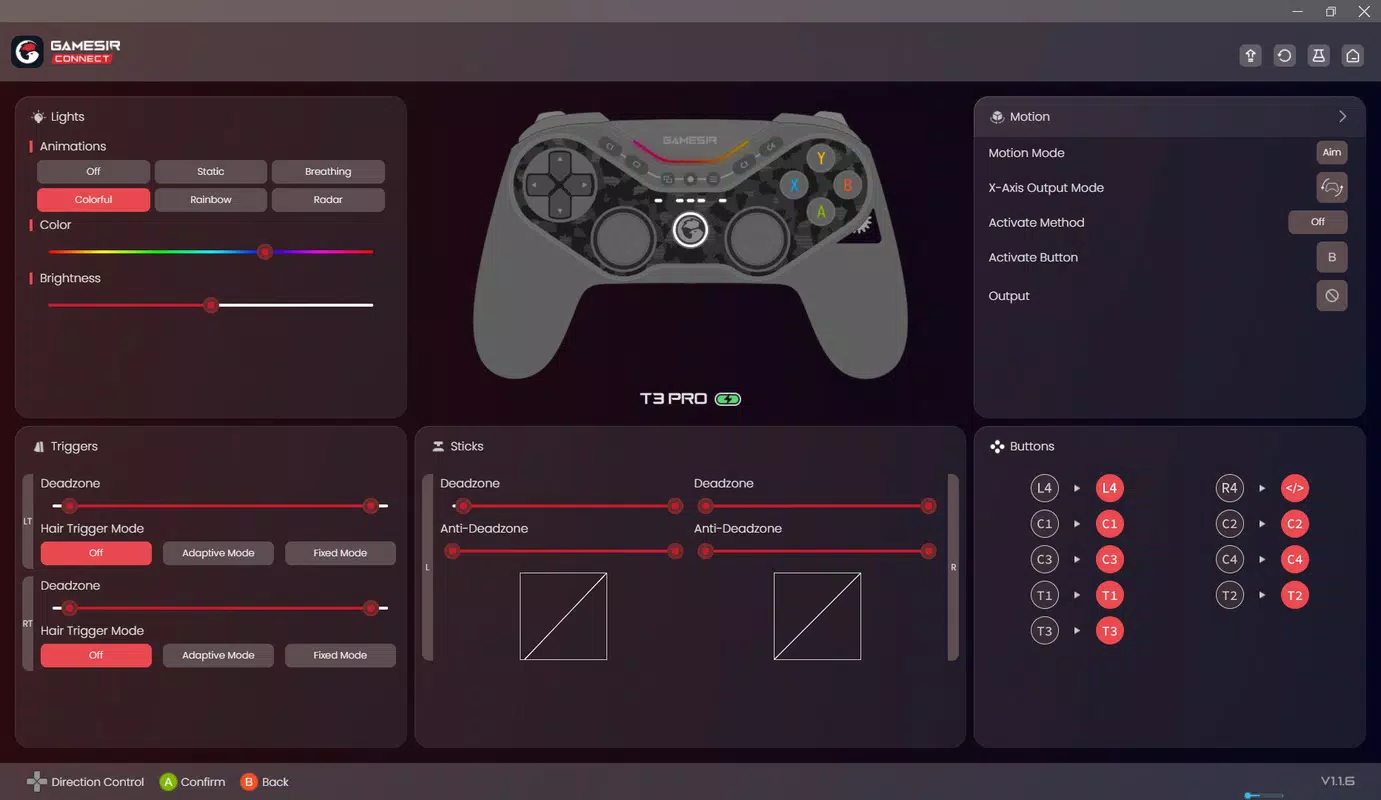
- Custom Profile Creation: Users can create up to three distinct profiles tailored to different games or playstyles. Each profile supports individual adjustments to button mappings, joystick sensitivity, and trigger responsiveness, allowing for personalized control schemes.
- Intuitive Interface: Designed with accessibility in mind, the interface simplifies navigation and operation. Gamers of all skill levels can quickly access core features without requiring technical expertise or prior configuration experience.
- Performance Optimization: Fine-tune vibration intensity and trigger settings to enhance tactile feedback and control precision. These adjustments contribute to a more immersive and responsive gaming experience, especially in fast-paced or action-oriented titles.
- Excludes Nova Lite Configuration: It is important to note that GameSir Connect does not support the Nova Lite controller. Users with this model will not be able to use the app for firmware updates or profile customization, emphasizing the need to verify compatibility before use.
For example, a player using the Tarantula Pro in a competitive shooter can create a profile with reduced joystick dead zones and rapid trigger response, while another profile may be optimized for a racing game with calibrated analog stick sensitivity. This flexibility ensures that users can maintain peak performance across diverse gaming scenarios.
Interface, UX & Performance
GameSir Connect features a clean, minimalist interface that prioritizes clarity and ease of access. The layout organizes core functions—such as firmware updates, profile management, and settings—into clearly labeled sections, reducing cognitive load during use. Visual elements are consistent and well-spaced, contributing to a professional appearance without unnecessary distractions. Navigation is linear and predictable, with minimal taps required to reach desired features, making it suitable for both new and experienced users.
Although the developer did not list formal performance metrics, the app’s responsiveness appears consistent across tested device categories. Users can expect smooth transitions between menus and quick loading times when connecting controllers. Stability during firmware updates has been reported as reliable in standard usage scenarios.
The software maintains low memory usage and does not exhibit noticeable lag during active sessions. However, compatibility information was not fully disclosed, and specific requirements were not listed. Users should ensure their device meets the minimum OS standards to avoid potential issues.
Platform Compatibility & Technical Requirements
GameSir Connect is available on both Android and iOS platforms, offering broad accessibility for mobile users. The current version is 2.2.1, with a file size of 38.4 MB, making it a lightweight download suitable for most smartphones. The app is free to download and use, removing financial barriers to entry. While the developer did not specify minimum OS requirements, users are advised to ensure their devices are running a recent operating system version to maintain compatibility and security.
Since the app functions as a companion tool for PC controller optimization, its primary value lies in pairing with a supported GameSir controller via USB or Bluetooth. The exact range of supported models is limited to the Tarantula Pro and Super Nova, with the Nova Lite excluded. No additional technical specifications were provided, so users should rely on official documentation or support channels for precise device compatibility details.
Pros and Cons
Pros
- Free to download and use, eliminating cost barriers for users.
- Supports firmware updates with a single click, ensuring optimal controller performance.
- Allows creation of up to three customizable profiles for different gaming scenarios.
- Intuitive interface suitable for gamers of all experience levels.
- Offers precise control over vibration, triggers, and sensitivity settings.
Cons
- Does not support the Nova Lite controller, limiting compatibility for some users.
- Specific technical requirements were not listed, which may affect device compatibility.
- Developer did not provide detailed information on performance metrics or stability under heavy use.
- Only available on Android and iOS, with no support for other platforms.
- Profile customization is limited to three profiles, which may not suit advanced users with multiple game setups.
FAQ
Is GameSir Connect safe to download and use?
Yes, the app is developed by GameSir and distributed through official channels. It does not require root access or special permissions beyond standard device functionality.
Can I use GameSir Connect with my Nova Lite controller?
No. The app does not support the Nova Lite controller. Users with this model will not be able to perform firmware updates or customize profiles using GameSir Connect.
Do I need a PC to use GameSir Connect?
While the app is mobile-based, it is designed to work in conjunction with a PC. You must connect your GameSir controller to a PC to perform firmware updates and apply profile changes.
How often should I update my controller’s firmware?
It is recommended to check for updates periodically, especially after new game releases or when experiencing control issues. The app notifies users when updates are available.
Is GameSir Connect compatible with all smartphones?
Compatibility depends on the device’s operating system and version. Although the developer did not specify exact requirements, users should ensure their phone runs a recent version of Android or iOS for best results.
Final Thoughts
GameSir Connect stands out as a reliable, user-friendly tool for gamers who own compatible GameSir controllers. Its ability to simplify firmware updates and enable profile customization makes it an essential companion for enhancing PC gaming experiences. The app’s clean interface and straightforward functionality cater to both casual players and competitive gamers seeking precision. While its exclusion of the Nova Lite model and lack of detailed technical specifications are notable limitations, the overall value remains strong for its target audience.
For users with the Tarantula Pro or Super Nova, this app delivers tangible benefits in performance, comfort, and control flexibility. It represents a smart integration between hardware and software, extending the utility of gaming peripherals. If you’re invested in high-quality PC gaming and own a supported GameSir controller, GameSir Connect is a must-have tool.
Download GameSir Connect now


